
How to buy crypto
We accept payment in USDT and USDC. If you don’t have them yet, here are three easy ways to buy: with Revolut, with Trust Wallet or on an exchange. At the end you will find how to send the payment for your order.
Part 1. Buying in Revolut
- Open the Revolut app and go to the Crypto section (bottom menu). The first time, tap Get started (in the UK Start trading), answer the questionnaire and accept the terms. In the UK you then have to wait 24 hours.
- Check your balance. If you don’t have enough money, tap Add money and top up your account by bank transfer, card, Apple Pay or Google Pay.
- Tap Trade and choose the cryptocurrency: USDT (Tether) or USDC (USD Coin).
- Tap Buy, enter the amount and choose which account to pay from.
- Tap Review order, check the rate, the fee and the final amount, then tap Confirm. The crypto you bought appears in the Crypto section.
- To pay for your order, open Crypto → Send, choose USDT or USDC and the network, then paste the address and the amount from the cart. The list of coins and networks available for withdrawal is shown in the app; for example, USDT is available on the Ethereum and TRON networks.
A completed order cannot be cancelled. Fee: on the free plan 1.49% of the amount, and for trades up to £/€200 a minimum fee applies (from £/€0.99 to £/€2.99). Small purchases are not cost-effective. Paid plans have lower fees. Check the current terms in the app.
Part 2. Buying in Trust Wallet
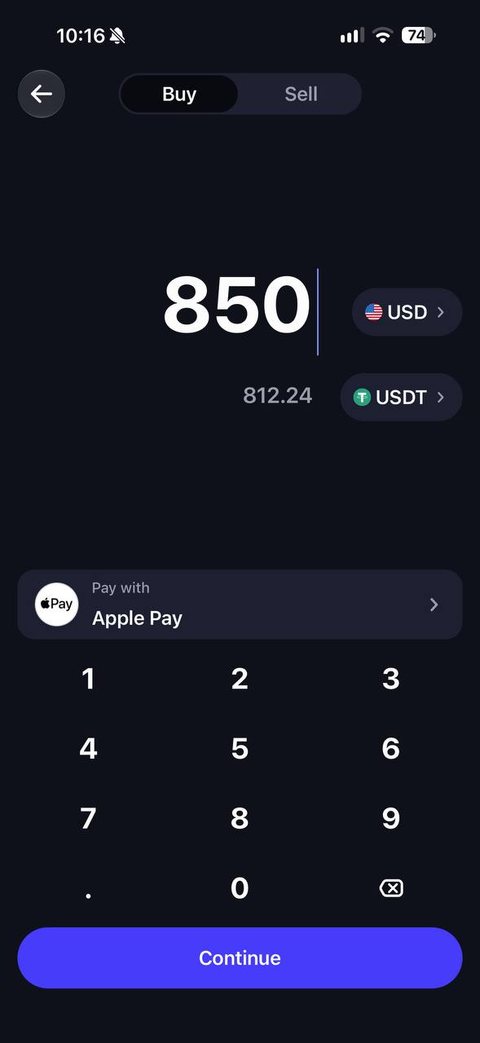
- Open Trust Wallet and tap Buy on the home screen.
- Find and choose USDT or USDC. If the app asks you to pick a network, choose the one you will pay in (for example TRON (TRC-20) or BNB Smart Chain (BEP-20)).
- Choose the currency, enter the amount and choose a payment method: card, bank transfer, Apple Pay, Google Pay or local payment methods.
- Choose a payment provider. The app shows the available providers with their fees.
- Tap Buy and complete the payment in the provider’s window. If required, go through the provider’s identity check (KYC).
- Wait for the funds to arrive. The crypto will be credited to your wallet address in the app.
- To pay for your order, tap Send, choose the coin and paste the address and the amount from the cart. For the network fee you need the native coin in your balance: TRX for TRC-20, BNB for BEP-20, ETH for ERC-20 and Arbitrum.
Part 3. Buying on an exchange
You can buy USDT or USDC on a large exchange, for example Binance, Kraken, Coinbase, Bybit or OKX. Which exchanges and payment methods are available depends on your country, so pick one that works in your region.
- Sign up and complete the identity check (KYC).
- Buy USDT or USDC in the buy section (Buy crypto) by card, bank transfer, Apple Pay or Google Pay. Many exchanges also have a P2P section where you can buy from other users.
- Open withdrawal (Withdraw), choose the coin, paste the address from the cart and choose the same network as in the cart.
- Check the withdrawal fee: if the exchange deducts it from the amount, add it on top so that at least the order amount reaches us.
Buy only on trusted platforms and never send money to unknown sellers outside the platform.
How to send the payment for your order
- Add the products to the cart, fill in the delivery details and tap the payment button.
- Choose the coin (USDT or USDC) and the network.
- Copy the address and the amount from the cart. Send the exact amount in the chosen network.
- Tap “I have paid”. The site checks the transfer on the blockchain, usually within 1–2 minutes.
Important: send only USDT or USDC, and only in the network you chose in the cart. A transfer in another network or with another coin means the funds are lost. The amount must be no less than the one shown.
This is an informational guide, not financial advice. The terms and fees of Revolut, Trust Wallet, providers and exchanges change: check them in the app before you buy. If anything is unclear, email us at info@allza.net.